What has always impressed me most about React is how portable it is. A website or a mobile app is the obvious case, but it reaches a lot further than that: email templates with react.email, printable PDFs with react-pdf, native 2D canvas with react-native-skia, 3D scenes with react-three-fiber, exported video with Remotion, and more.
That portability is what makes React more than just a front-end library, and turns it into something closer to a declarative language in its own right. You describe a tree of components, and a renderer turns it into a screen, a document, a video, or something entirely unrelated to UI, like audio. Every target that gets a renderer inherits the entire ecosystem around it: the hooks, the state model, the muscle memory of every developer who already knows React. The saying "always bet on React" reads more true each year.
One of those surfaces is the terminal, and it is having a particular moment. The applications being built there now, like Claude Code, the Gemini CLI, and opencode, are not the CLIs of a decade ago. They stream model output token by token, redraw on every keystroke, and hold dense interactive layouts on screen for sessions that run for hours.
All three are built with React, and all ran into the same wall: keeping the interface responsive as the application grows, instead of getting slower the more there is on screen. Anthropic developed a custom renderer for Claude Code, opencode built OpenTUI from scratch, and the Gemini CLI team maintains a fork of Ink, the de-facto library for React terminal apps.
I wanted to dig into this subject myself, to get a firmer grasp of the complexity and the trade-offs this kind of project involves, and eventually I started building my own React renderer for the terminal: Knit.
Knit is built around one goal above the rest: performance. An application should stay fast and responsive whether it's small or massive. Much of that comes from techniques borrowed from video game rendering, like double buffering and differential rendering. They work well, but a terminal application has one peculiarity to deal with: everything is text.
When you look closely, everything in a terminal application comes down to text: rendering a box, wrapping a paragraph, advancing a cursor. Handling text is the lowest-level operation any terminal renderer performs, and if it's slow, no optimization above it matters: the rest of the work is wasted on top of a bottleneck.
It is tempting to think text is the easy part: a string is just a sequence of characters, what is there to get wrong? But the deeper you dig, the more the ground gives way, and a single string turns out to hide layer upon layer of complexity that a renderer has to get exactly right.
That complexity is why measuring text is not a helper function tucked away somewhere in Knit, but one of its foundational pieces, the layer everything else is built on. This article is about that piece, precompute, and the problems it had to solve to get measurement out of the renderer's way.
Characters lie about their size
A terminal cell is the equivalent of a pixel. Rendering text correctly requires solving two interrelated problems:
Characters don't all occupy the same number of columns. a takes 1 column. 中 takes 2. 😀 takes 2. Some characters take 0. A terminal renderer can't just count characters: it needs the actual column width of each grapheme, and there's no shortcut to get it.
Characters don't all occupy the same number of code units, the individual units that make up a string's .length. a is 1 code unit. 中 is 1. 😀 is 2 (i.e. '😀'.length is 2). 👨👩👧👦 is 11. Indexing into text, advancing a cursor by one grapheme, slicing a substring, etc: none of these are trivial when the number of code units per grapheme varies.
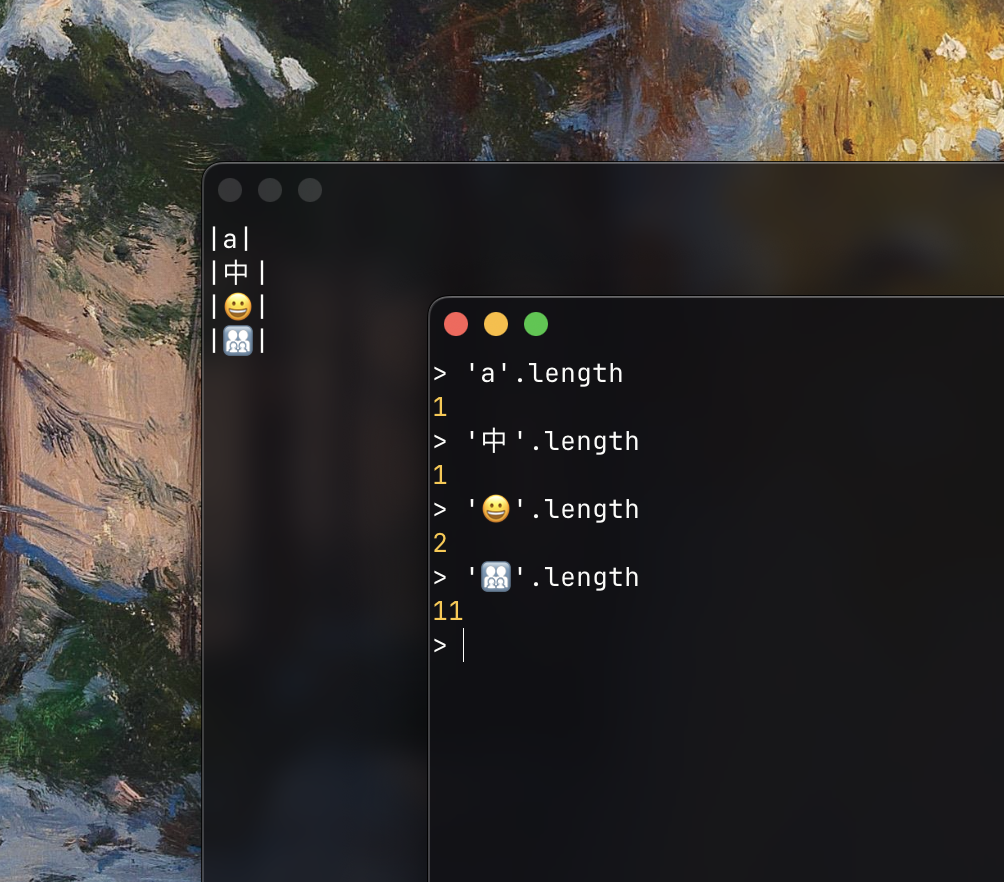
Left: each character drawn between pipes, exposing its column width. Right: the same characters' .length. The two diverge completely, 👨👩👧👦 is 2 columns wide yet 11 code units long.
Any terminal renderer that handles text needs to resolve both of these for every grapheme. The question is when.
When to measure
The naive approach is to measure at the point of use. Need the width for layout? Call a string-width function. Need it again for line breaking? Call it again. Need it for painting? Again. Need it for cursor positioning? Again.
Ink, which established React rendering in the terminal, measures text this way.
- During layout, each text element is split on newlines, and each line is measured with
string-widthto determine the element's dimensions. - After layout, the rendering pass performs the same split-and-measure to check whether the text fits within the computed width, and re-wraps it if it doesn't.
- Then the final output step writes characters to the terminal buffer one by one, measuring each to determine whether it occupies one or two columns.
All of this runs at every render, whether the text changed or not. Because a raw string carries none of its own structure, each stage re-derives the same information by walking the string again.
What the naive approach costs
Consider Ink's cursor positioning example, from their documentation:
import { useState } from 'react'
import { Box, Text, useCursor } from 'ink'
import stringWidth from 'string-width'

const TextInput = () => {
  const [text,] = useState('')
  const { setCursorPosition } = useCursor()

  const prompt = '> '
  setCursorPosition({ x: stringWidth(prompt + text), y: 1 })

  return (
    <Box flexDirection="column">
      <Text>Type here:</Text>
      <Text>{prompt}{text}</Text>
    </Box>
  )
}
One stringWidth call, visible in the code. But the rendering pipeline has its own needs. To display these two lines of text, 12 characters on screen, Ink calls string-width 14 times:
| stage | what it measures | calls |
|---|---|---|
| userland | prompt + text | 1 |
| layout | each text element | 2 |
| paint | same elements, again | 2 |
| compositing | each character, one by one (+ 3 cache hits) | 9 |
| total | 14 |
Call counts measured with Ink 7.1.0 (wrap-ansi 10.0.0, string-width 8.2.1)
For 12 characters of ASCII text, 14 calls is negligible: the total cost barely registers. The problem shows up when things scale: a longer string, a width constraint, and text that needs to wrap.
Consider the following example:
┌────────────────────────────────────────┐  40 columns
│ > The quick brown fox jumps over the   │
│ lazy dog and keeps running             │
└────────────────────────────────────────┘
The count jumps to 85. Most of the increase comes from wrap-ansi, Ink's wrapping library, which finds line break positions by measuring growing prefixes of the text:
stringWidth(">")                                         → 1
stringWidth("> The")                                     → 5
stringWidth("> The quick")                               → 11
stringWidth("> The quick brown")                         → 17
stringWidth("> The quick brown fox")                     → 21
stringWidth("> The quick brown fox jumps")               → 27
stringWidth("> The quick brown fox jumps over")          → 32
stringWidth("> The quick brown fox jumps over the")      → 36
stringWidth("> The quick brown fox jumps over the lazy") → 41  ← exceeds 40, break before "lazy"
Each call re-scans every character that was already scanned in the previous call. To find where the line breaks, wrap-ansi measures the first word, then the first two words, then the first three, and so on, each time re-measuring the entire prefix from the beginning.
Every call repeats the work of all previous calls. The growth is quadratic: the cost of finding a break point isn't proportional to the line length, but to its square.
The wrapping example is still a static render: the text is fixed. When the component also handles keyboard input, each keystroke triggers a new render. No measurement from the previous frame carries over: the text changed by one character but the entire string is re-walked from the beginning.
Take that same 40-column example and add interactivity: five characters typed produce six renders, the initial one plus one per keystroke, and the full string is re-measured each time. The total comes to 513 string-width calls for two wrapped lines across six frames.
Where Ink's model stops scaling
For lightweight CLI tools like a spinner, a progress bar, a confirmation prompt, etc, none of this is a bottleneck. Ink proved the model, and a whole ecosystem grew around it.
The cost started to matter when terminal applications grew in complexity: AI agents streaming output token by token, editors redrawing on every keystroke, dashboards holding several live regions at once.
At that scale, re-measuring all visible text at every frame adds up, and the projects pushing terminal rendering the hardest have started to hit this wall. Anthropic built Claude Code on top of Ink. After users reported flickering, Anthropic developed a custom renderer to replace it, still in research preview as of this writing.
The OpenCode project made the choice from the start. It developed its own terminal UI library, OpenTUI, with a Zig core that replaces the measurement pipeline entirely with precomputed segment widths.
To be clear, text measurement isn't the sole reason these projects built their own renderers; the limitations are structural and span multiple subsystems. But redundant measurement is one of them, and the one precompute addresses.
What doesn't need to be in the render loop
The question isn't how to measure faster, it's whether to measure inside the render loop at all. Two observations suggest it doesn't have to be there:
If the text hasn't changed, every measurement returns the same result. Grapheme boundaries and column widths are properties of the text itself. They don't depend on the layout width, the terminal size, or anything else that changes between frames.
Terminal text is structurally homogeneous. Most content is ASCII, where every grapheme is 1 column wide and 1 code unit long. CJK text is different (2 columns, 1 code unit) but equally uniform within itself. Even when scripts mix, they tend to cluster. A string that mixes scripts can still be described by very few groups rather than a long list of individual measurements.
precompute exploits both. It walks the string once, segments it into graphemes, and groups consecutive graphemes with the same column width and code-unit stride into runs.
TextRuns
A TextRun is a span of consecutive graphemes that share the same width and stride. When either changes, a new run begins.
interface TextRun {
  text: string    // the raw text of this run
  offset: number  // start position in the original string
  width: number   // terminal columns per grapheme (0, 1, or 2)
  stride: number  // code units per grapheme
}
(Shown with the run's text inlined for readability; the real type carries length instead, i.e. how many code units the run spans in the original string, not the substring itself.)
For ASCII text, the vast majority of terminal output, the entire string is a single run:
"hello world"
→ [{ text: "hello world", offset: 0, width: 1, stride: 1 }]
One run. Every grapheme is 1 column wide, 1 code unit long.
When the text contains characters with different properties, runs split at the boundaries:
"hello 😀 world"
→ [
    { text: "hello ", offset: 0, width: 1, stride: 1 },
    { text: "😀",     offset: 6, width: 2, stride: 2 },
    { text: " world", offset: 8, width: 1, stride: 1 }
  ]
Three runs. The emoji is 2 columns wide and 2 code units long (a surrogate pair), so it gets its own run, width and stride change together. The ASCII text on either side groups naturally.
Width and stride don't always move together. A CJK character like 世 takes 2 columns but only 1 code unit. A ZWJ sequence like 🏴☠️ also takes 2 columns but spans 4 code units. Same display width, completely different internal structure:
"hello 世界! 🏴☠️"
→ [
{ text: "hello ", offset: 0, width: 1, stride: 1 },
{ text: "世界", offset: 6, width: 2, stride: 1 },
{ text: "! ", offset: 8, width: 1, stride: 1 },
{ text: "🏴☠️", offset: 10, width: 2, stride: 4 }
]
Four runs. 世界 and 🏴☠️ both display as 2 columns wide, but their strides, 1 and 4, are entirely different. The run structure captures both dimensions independently.
Text goes from an opaque string that gets re-analyzed on demand to a structured sequence of homogeneous runs with known properties.
What runs unlock
With runs in place, layout, line breaking, painting, and cursor navigation all read from the same precomputed result. Working with the text is trivial arithmetic.
Take visual width. For the string from before, "hello 世界! 🏴☠️":
run 0: "hello " → 6 code units / stride 1 × width 1 = 6 columns
run 1: "世界" → 2 code units / stride 1 × width 2 = 4 columns
run 2: "! " → 2 code units / stride 1 × width 1 = 2 columns
run 3: "🏴☠️" → 4 code units / stride 4 × width 2 = 2 columns
total: 14 columns
Because each run is internally uniform, the same formula applies to all of them, regardless of script, encoding, or grapheme complexity. The per-grapheme work is done once, at precomputation, and never repeats across subsequent frames.
Cursor navigation is simpler still. The cursor sits inside a run with a known stride, moving forward by one grapheme is position += stride. One addition.
Break segments
Runs tell the renderer how wide each grapheme is, but they don't tell a line breaker where a break is allowed. That's a different question, and it needs a different primitive.
A break segment is a unit of text between two break opportunities, positions where a line break is allowed. A line breaker can break between two segments, never inside one. Unlike runs, which split when width or stride changes, segments split at break opportunities only, so a single segment can contain graphemes of any width or stride.
Segments come in four variants. The simplest is the Word, a span from one break opportunity to the next. Each Word carries its position in the source and its dimensions:
// Word segment
{
  type: BreakSegmentType.Word
  offset: number  // start position in the source (code units)
  length: number  // code units in this segment
  width: number   // column width
}
For the 40-column example from earlier:
"> The quick brown fox jumps over the lazy dog and keeps running"
→ [
    { type: BreakSegmentType.Word, offset: 0,  length: 2, width: 2 },  // "> "
    { type: BreakSegmentType.Word, offset: 2,  length: 4, width: 4 },  // "The "
    { type: BreakSegmentType.Word, offset: 6,  length: 6, width: 6 },  // "quick "
    { type: BreakSegmentType.Word, offset: 12, length: 6, width: 6 },  // "brown "
    { type: BreakSegmentType.Word, offset: 18, length: 4, width: 4 },  // "fox "
    { type: BreakSegmentType.Word, offset: 22, length: 6, width: 6 },  // "jumps "
    { type: BreakSegmentType.Word, offset: 28, length: 5, width: 5 },  // "over "
    { type: BreakSegmentType.Word, offset: 33, length: 4, width: 4 },  // "the "
    { type: BreakSegmentType.Word, offset: 37, length: 5, width: 5 },  // "lazy "
    ...
    { type: BreakSegmentType.Word, offset: 56, length: 7, width: 7 }   // "running"
  ]
Note that each Word segment includes its trailing space.
A greedy line breaker walks the array, accumulating widths. For a 40-column box, the running width reaches 37 after "the ". Adding "lazy " (width 5) would push it to 42, overflowing the box, so the break lands between them. Both values come straight from the array: no re-measurement, no re-scanning of the source.
Break opportunities sit at grapheme boundaries. The concept comes from UAX #14, Unicode's line breaking algorithm, the closest analogue to what precompute does here. One notable difference is the unit: UAX #14 places its break opportunities between code points, whereas precompute places them between graphemes. Graphemes are the unit it already segments into, so reusing them avoids re-walking the text at a finer level.
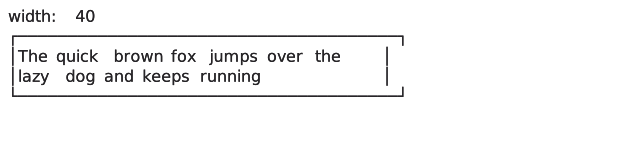
Over one loop of this resize animation, Knit makes a single precompute call on first render; an equivalent Ink app re-wraps every frame resulting in 4,559 string-width calls for a sentence that never changes.
For most text (ASCII, Latin scripts, whitespace-delimited content), segmentation is a flat stream of Words and wrapping is a sum over their widths. Some situations don't fit this model.
Not just words
Three more variants cover what Word doesn't: mandatory line breaks, ideographic scripts, and long runs of adjacent spaces.
HardBreak segments mark mandatory line breaks: \n, \r, or \r\n in the source. They're markers, not measurable spans, so they carry no width, only a length recording how many code units the break consumed (1 for \n, 2 for \r\n). When a line breaker reaches one, it closes the current line and continues, no special-case detection needed.
Ideographic segments bundle runs of ideographs. Chinese, Japanese, and Korean scripts (CJK) and emojis treat each ideograph as its own break opportunity: there's no whitespace to delimit words. Representing each as its own segment would inflate the sequence: a line of 50 Chinese characters would become 50 entries of identical shape.
Instead, consecutive ideographs with the same stride and width collapse into a single Ideographic segment, one entry regardless of the run's length, keeping the memory footprint bounded. It carries a per-grapheme width rather than a single total width:
{
  type: BreakSegmentType.Ideographic,
  offset: 0,
  length: 3,
  stride: 1,
  widthPerGrapheme: 2
}
// three ideographs, each 2 columns wide
This is the only segment type where a break can happen inside. The whole segment is a sequence of break opportunities by definition, so a line breaker iterates grapheme by grapheme, adding one grapheme's width at each step.
Scripts without word delimiters that aren't ideographic: Thai, Khmer, Lao, and other Brahmic scripts, etc, require dictionary-based segmentation and fall outside the current scope. Per UAX #14, when no such analysis is available, these scripts are treated as a single span with no interior break opportunities. precompute follows that, emitting them as a single Word segment. Where a line breaker chooses to break a long run is then its own decision.
Space segments hold runs of adjacent whitespace, split into small groups (two by default). Bundling every adjacent space into a single segment would make the entire run overflow together, jumping to the next line on a single column of excess. Splitting them keeps the overflow gradual.
Put together, the four variants form the complete BreakSegment type:
type BreakSegment =
  | { type: BreakSegmentType.Word; offset: number; length: number; width: number }
  | { type: BreakSegmentType.Space; offset: number; length: number; width: number }
  | { type: BreakSegmentType.Ideographic; offset: number; length: number; stride: number; widthPerGrapheme: number }
  | { type: BreakSegmentType.HardBreak; offset: number; length: number }
Together with runs, segments form a PrecomputedText, the output precompute returns in a single pass:
interface PrecomputedText {
  source: string
  runs: readonly TextRun[]
  segments: readonly BreakSegment[]
}
Segments describe where a break is allowed, not where to take one. That decision belongs to the line breaker, whose strategy (greedy word-wrap, balanced line lengths, overflow handling, justification) applies different rules at each opportunity. Whatever the script or the strategy, wrapping becomes trivial: an integer running sum over a pre-built sequence.
What wrapping costs now
The benchmark below uses a line breaker built on PrecomputedText to word-wrap four texts into a 40-column box, comparing it against wrap-ansi, Ink's wrapping library. Note that the comparison isn't strictly 1:1: wrap-ansi handles ANSI escape sequences during wrapping, preserving styling across line breaks. In Knit, styling is handled by an upstream layer, narrowing wrapping to its minimal scope. Side by side, the cost of each approach comes out like this:
| Text | chars | wrap (warm) | precompute + wrap (cold) | wrap-ansi (cold) | wrap (warm) vs wrap-ansi (cold) |
|---|---|---|---|---|---|
| Alice's Adventures in Wonderland — Ch. 1 (English) | 1,328 | 1.23 µs | 64.95 µs | 111.89 µs | 91x faster |
| Universal Declaration of Human Rights (English) | 10,771 | 10.84 µs | 496.52 µs | 1.10 ms | 101x faster |
| Universal Declaration of Human Rights (French) | 12,568 | 12.54 µs | 589.15 µs | 71.98 ms | 5,743x faster |
| I Am a Cat — Opening (Japanese) | 490 | 1.21 µs | 35.83 µs | 5.49 ms | 4,530x faster |
cpu: Apple M4 — runtime: bun 1.3.10 (arm64-darwin) — wrap-ansi 10.0.0
wrap (warm) is a wrapping function built on PrecomputedText, this is the per-frame cost when text hasn't changed.
precompute + wrap (cold) same as wrap but includes segmentation, the cost paid when text is new or modified.
wrap-ansi (cold) segments and wraps from scratch every time.
It's worth noting that the fair comparison about running cost is between the warm wrap and wrap-ansi, which is cold by design. wrap-ansi has no warm path: it re-segments from scratch on every frame, so its cold cost is its running cost. Knit pays cold only on the first frame; every frame after that, as long as the text is unchanged, is warm. The wrap (warm) vs wrap-ansi (cold) column of the table reflects that difference in approach.
One key observation about the results is that on the two English texts, the speedup is roughly consistent, ~95x. The reason it's not higher: wrap-ansi delegates every measurement to string-width, which has a fast path for printable ASCII.
// string-width fast path: printable ASCII needs no segmenter, regex, or EAW lookup — width equals length.
if (/^[\u0020-\u007E]*$/.test(string)) {
    return string.length;
}
But this fast path is fragile: a single non-ASCII character in the string disables it entirely. Every measurement falls through to the full segmentation pipeline and the cost per call jumps by orders of magnitude. And even when it does activate, wrap (warm) is still over 90x faster.
The effect is visible in the benchmark. The English and French versions of the Universal Declaration of Human Rights are translations of the same document. The French version is 17% longer. With wrap-ansi, the English version wraps in 1.10 ms. The French version takes 71.98 ms, ~65x slower.
That gap isn't just "slower". 72 ms per text element, on every render, is multiple frames of blocked rendering for a single page of French. For any internationalized interface, wrap-ansi isn't a viable option.
By contrast, wrap (warm) scales with text length regardless of what characters it contains. The French version wraps in 12.54 µs, over 5,700x faster than wrap-ansi.
The pattern holds for short text too. The opening of I Am a Cat by Natsume Sōseki is only 490 characters of kanji, hiragana, and katakana. wrap-ansi wraps it in 5.49 ms. wrap (warm) wraps it in 1.21 µs, 4,530x faster.
Even with segmentation included, precompute + wrap (cold) still beats wrap-ansi on every text tested, by 1.72× to 153×. The advantage shows up on the first render, not only on subsequent ones.
Keep in mind that these benchmarks measure a single text element wrapping. In Ink, this cost is paid for every text element, on every render, whether the text changed or not, and it adds up as the amount of text on screen grows. Precomputed text flips this: the cold cost is paid once per text, and every render after that pays only the warm cost, which the benchmark shows is effectively free.
Versus a native core
Until now, the comparison was only against Ink, the de-facto standard for React in the terminal, known in part for its performance limitations. A more revealing comparison is how Knit holds up against a renderer built for speed from the start.
OpenTUI is the React terminal renderer behind OpenCode, and probably the most serious challenger to Ink. It shares Knit's two-phase shape: a cold segmentation pass first, then warm wrapping on top. That shared shape makes the two engines genuinely comparable: the same work measured on each side.
One thing sets it apart: its core is written in Zig, so it can lean on native optimizations like SIMD to compute things in bulk, grapheme width measurement among them. While Knit is written entirely in JavaScript, let's see how it compares against native code on the grapheme-related work.
| Text | chars | precompute + wrap (cold) | opentui unicode | opentui wcwidth | precompute + wrap (cold) vs opentui (cold) |
|---|---|---|---|---|---|
| Alice's Adventures in Wonderland — Ch. 1 (English) | 1,328 | 62.87 µs | 26.16 µs | 26.09 µs | 2.41× slower |
| Universal Declaration of Human Rights (English) | 10,771 | 503.85 µs | 88.39 µs | 88.72 µs | 5.70× slower |
| Universal Declaration of Human Rights (French) | 12,568 | 593.69 µs | 169.55 µs | 165.57 µs | 3.59× slower |
| I Am a Cat — Opening (Japanese) | 490 | 35.86 µs | 66.78 µs | 57.45 µs | 1.60× faster |
precompute + wrap (cold) is the same function as in the previous benchmark, segmentation included, the cost paid when text is new or modified. opentui unicode OpenTUI's wrapping using the modern Unicode width rules, more correct but a little heavier. opentui wcwidth OpenTUI's wrapping using the older fixed width table most terminals still use, lighter but less accurate.
This benchmark measures the cold cost, segmentation included. To avoid picking the OpenTUI width method that would flatter Knit, the comparison uses whichever of the two runs faster.
Unsurprisingly, OpenTUI is faster than Knit across most of the corpus, by up to ~5.7×. But a closer look shows the results don't all go its way: on short text, Knit keeps pace and even edges ahead, as on the opening of I Am a Cat, just 490 characters.
This may look counterintuitive, but the comparison isn't strictly native code against JavaScript. OpenTUI's core is in Zig, yet its userland stays in JavaScript, so each call into the core crosses an FFI boundary (foreign function interface), and that crossing costs the same fixed amount however much text is behind it. Over thousands of graphemes it is amortized across the work, so the per-grapheme share is negligible; on short text it dominates. Knit, staying in JavaScript, never pays it.
Native calls stay an advantage on heavy work, but turn into a handicap on small operations, where there isn't enough work to dilute the fixed cost. That shows up most on the hot path: wrapping text once segmentation is done.
| Text | chars | wrap (warm) | opentui re-wrap (warm) | wrap (warm) vs opentui re-wrap (warm) |
|---|---|---|---|---|
| Alice's Adventures in Wonderland — Ch. 1 (English) | 1,328 | 873.79 ns | 15.52 µs | 17.8× faster |
| Universal Declaration of Human Rights (English) | 10,771 | 8.03 µs | 41.01 µs | 5.1× faster |
| Universal Declaration of Human Rights (French) | 12,568 | 9.30 µs | 45.97 µs | 4.9× faster |
| I Am a Cat — Opening (Japanese) | 490 | 1.04 µs | 38.12 µs | 36.7× faster |
cpu: Apple M4 — runtime: bun 1.3.10 (arm64-darwin) — @opentui/core 0.4.2
wrap (warm) is the same warm wrapping function as in the previous benchmarks, run on already-segmented text at a new width. opentui re-wrap (warm) is OpenTUI re-wrapping already-measured text at a new width, the layout recomputed through its core.
The table above measures the warm path. Segmentation has already run, on both sides, and the text doesn't change; only the width does, as it would on a terminal resize or a React re-render of unchanged text. So this isn't the first wrap, it's the cost of every wrap after it.
Where OpenTUI led the cold benchmark, native code won because the FFI cost was paid once and amortized over the whole text. On the warm path, on the other hand, that amortization is gone: the text is already segmented, so each re-wrap pays the crossing again with nothing to absorb it. The advantage that native code had on the cold path turns into a penalty here, and the comparison flips: Knit's wrap runs 4.9× to 36.7× faster across the corpus.
Note that the margins aren't constant, which means the warm cost isn't only the fixed FFI cost. A variable part grows with the text, and the longer the text, the more it dominates and dilutes that fixed cost. That's why the gap is wider on short texts than on long ones.
Running the same warm test on longer and longer inputs makes the trend explicit. The exact figures depend on the kind of text: French, CJK, emoji and so on each behave differently, so to isolate the effect of length alone the input is kept to plain ASCII and only grown longer. The advantage shrinks as the variable part takes over:
| chars | wrap (warm) | opentui re-wrap (warm) | knit (warm) vs opentui (warm) |
|---|---|---|---|
| 10,771 | 10.05 µs | 43.85 µs | 4.4× faster |
| 43,084 | 36.23 µs | 119.37 µs | 3.3× faster |
| 107,710 | 89.36 µs | 290.67 µs | 3.3× faster |
| 269,275 | 219.38 µs | 633.11 µs | 2.9× faster |
| 646,260 | 724.28 µs | 1.45 ms | 2.0× faster |
| 1,615,650 | 3.69 ms | 3.71 ms | 1.01× faster |
| 2,692,750 | 7.13 ms | 6.29 ms | 1.1× slower |
| 4,039,125 | 12.86 ms | 9.74 ms | 1.3× slower |
| 10,017,030 | 32.89 ms | 25.09 ms | 1.3× slower |
cpu: Apple M4 — runtime: bun 1.3.10 (arm64-darwin) — @opentui/core 0.4.2
The advantage narrows to a tie around 1.6 million characters and then inverts: past roughly 2.7 million, OpenTUI becomes faster again and stays ahead from there. On inputs that large Knit's cost per character climbs above OpenTUI's, and since OpenTUI no longer has a fixed cost weighing it down at that scale, it comes out ahead. Still, that size is far from anything a terminal renders; at realistic lengths Knit stays ahead.
The trade is clear-cut. OpenTUI wins the cold path, the work of segmenting fresh text, paid once per text. Knit wins the warm path, re-wrapping text it has already segmented, paid on every frame after as long as the text doesn't change. Native code wins where the work is heavy and rare; Knit where it's light and repeated, and a renderer spends most of its life re-wrapping text it has already measured.
Measuring a grapheme width
Runs and breakpoints eliminate redundant work between frames. But to build them, every grapheme must be measured at least once. The segmentation pass walks the string, isolates each grapheme, and determines its column width. This is the cost behind the precompute + wrap (cold) column in the benchmark above, the price paid whenever text changes.
The question shifts: how fast can a single grapheme be measured?
The three most commonly used tools in the JavaScript ecosystem for measuring terminal string width are string-width the de facto standard, fast-string-width a faster alternative, and Bun.stringWidth. All three are designed to measure complete strings, but building runs and breakpoints requires resolving column widths grapheme by grapheme.
They can technically be called on a single grapheme, but none are optimized for that constraint. It is also worth noting that Bun.stringWidth, the fastest of the three, is a Bun-specific API, and Knit is designed to be runtime-agnostic, so it can't be used here.
Because grapheme width resolution is the hot path of the segmentation pass, a custom internal function, computeGraphemeWidth, was built for it, designed to resolve the column width of a single grapheme at a time.
The narrower scope eliminates the per-string overhead, and the implementation itself is straightforward: conditional branching over Unicode ranges. The benchmark below shows the combined effect.
| grapheme | computeGraphemeWidth | Bun.stringWidth | computeGraphemeWidth vs Bun.stringWidth | string-width | fast-string-width |
|---|---|---|---|---|---|
| ASCII letter | 6.70 ns | 26.03 ns | 3.88× faster | 13.90 ns | 55.43 ns |
| accented (é) | 8.04 ns | 12.46 ns | 1.55× faster | 4.54 µs | 54.25 ns |
| CJK (中) | 19.73 ns | 27.18 ns | 1.38× faster | 5.90 µs | 137.02 ns |
| emoji skin tone (👋🏽) | 65.60 ns | 53.35 ns | 1.23× slower | 5.34 µs | 92.69 ns |
| ZWJ family (👨👩👧👦) | 65.87 ns | 118.28 ns | 1.80× faster | 950.56 ns | 103.58 ns |
cpu: Apple M4 — runtime: bun 1.3.10 (arm64-darwin) — string-width 8.2.0, fast-string-width 3.0.2
The benchmark shows that string-width and fast-string-width are not competitive in a per-grapheme context.
The notable result is the comparison with Bun.stringWidth, which is native code written in Zig, typically an advantage in performance-sensitive code. Yet computeGraphemeWidth, pure JavaScript, is faster on most graphemes, slightly slower on some, and overall in the same ballpark.
The same fixed cost seen earlier is at work: every call to Bun.stringWidth crosses the JavaScript–Zig boundary, and that crossing is a flat charge per call regardless of how much text is behind it. On a whole string it would spread across every character and disappear; called once per grapheme, it's paid in full at each one. Bun.stringWidth is built for whole strings, where that cost amortizes; computeGraphemeWidth is built for the per-grapheme case measured here.
Width is also a correctness problem
Beyond performance, computeGraphemeWidth addresses a subtler issue. Adding a single codepoint can change a character's width: ❤ (U+2764) is 1 column wide, but ❤️ (U+2764 U+FE0F) is 2. That extra codepoint is a variation selector: it switches the character from text presentation to emoji presentation, doubling the width.
The spec is clear, but terminals aren't bound by it. Ghostty reserves the two columns the spec calls for; macOS Terminal, for instance, renders ❤️ at one column anyway, and exotic codepoints can diverge similarly from one emulator to the next. A renderer has to pick a side.
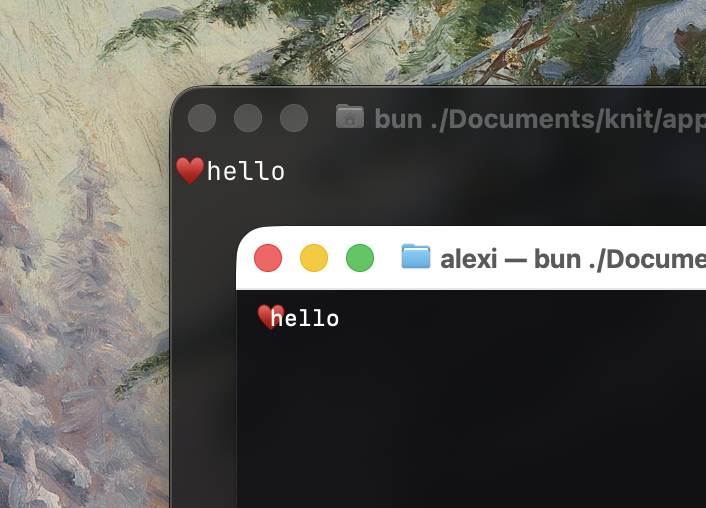
Behind: Ghostty reserves two columns for ❤️, so hello clears it. In front: macOS Terminal draws it in one, and h collides with the heart.
On variation selectors, precompute sides with the spec by default, reporting 2 columns. That ensures the layout engine reserves enough space so adjacent elements don't collide with the emoji, even on terminals that render it in one.
For cases where the exact column count matters, computeGraphemeWidth accepts an option to disable variation selector handling. The existing libraries follow the spec unconditionally, with no way to opt out.
API
The full API is a single function:
interface PrecomputeOptions {
  respectVariationSelectors?: boolean
  maxTrailingSpaces?: number
  maxConsecutiveSpaces?: number
}

interface TextRun {
  offset: number // absolute offset in source, code units
  length: number // total code units in this run
  width: number // column width per grapheme
  stride: number // code units per grapheme
}

type BreakSegment =
  | {
      type: BreakSegmentType.Word
      offset: number // absolute offset in source, code units
      length: number // total code units in this segment
      width: number // total column width
    }
  | {
      type: BreakSegmentType.Space
      offset: number // absolute offset in source, code units
      length: number // total code units in this segment
      width: number // total column width
    }
  | {
      type: BreakSegmentType.Ideographic
      offset: number // absolute offset in source, code units
      length: number // total code units in this segment
      stride: number // code units per grapheme
      widthPerGrapheme: number // column width per grapheme
    }
  | {
      type: BreakSegmentType.HardBreak
      offset: number // absolute offset in source, code units
      length: number // code units consumed by the break (e.g. 1 for \n, 2 for \r\n)
    }

interface PrecomputedText {
  source: string
  runs: readonly TextRun[]
  segments: readonly BreakSegment[]
}

const precompute = (source: string, options?: PrecomputeOptions): PrecomputedText
respectVariationSelectors defaults to true, enabling spec-compliant VS15/VS16 handling so ❤️ reports 2 columns and ❤︎ reports 1. Disable it only when matching the exact terminal column count matters more than layout safety, see the previous section.
maxTrailingSpaces and maxConsecutiveSpaces default to 2. They cap how many spaces a single Space break segment can hold before a break opportunity is forced, preventing unbounded segment growth on pathological inputs.
Conclusion
Ink proved that React could work in the terminal. It gave us components, hooks, Flexbox layout, a familiar model in a space that had nothing like it. Production tools at every scale are built on it today.
But the performance constraints that matter today weren't what mattered when Ink was built. Terminal applications now stream thousands of tokens, handle rapid keyboard input, and maintain dense interactive layouts.
Of these, token streams have a structural property worth naming. Tokens arrive append-only: the model never revises what it has already emitted. The precomputed state of the prefix stays valid forever; only the tail can grow.
This points to a natural extension of precompute: an incremental variant that extends a previous result rather than recomputing the whole thing. Such an API doesn't exist today, but the structure invites it. For applications streaming thousands of tokens at interactive rates, the cost currently paid on every token would collapse to the size of the chunk added.
This article focused on text measurement because every text operation depends on it. But precomputation is one layer in a larger stack: double buffering, differential rendering, and virtualization, each addressing a different part of the render-loop cost. In Knit, precompute is the foundation they build on.
Still, none of this changes the nature of the medium. Terminal width is, and will remain, a best-effort agreement between Unicode and the terminal emulator.